The shape of the document, not a pile of fragments.
A PDF is indexed as a tree of sections. The agent reasons over that structure to find what is relevant. It does not pull the passage that merely looks similar.
Introducing Orbi
Specialist co-workers with a standing role, a conversation and the tools to get real work done.
Early development A Sensus InVista project
These are connections an agent can be given. A logo here is not a promise that the connection is switched on.





















A standing role and a dedicated channel mean every request starts with context.
The skills, sources and workspace that match the job.
Your methods, brand and permissions built into every result.
A role that lasts
Ask a question, develop a brief or return to a decision. Each co-worker keeps the conversation, context and decisions in one place — so the work resumes instead of restarting.
Meet your workspaceAgree the scope.
Approved project notes attached.
Prepare the review brief.
Open questions kept visible.
Continue from the feedback.
The conversation stays here.
Illustrative conversation
While you are still talking
On a call, you can ask it to run a connector, or to open a browser or a document on its cloud computer. The task happens while you are still talking.
Ask for the connector, the browser, or the document.
The task runs during the call, and only with what you have turned on.
The outcome comes back while the conversation is still open.
Asking an agent about a PDF is built in. The file goes in. The answer comes back with the page it came from.
A PDF is indexed as a tree of sections. The agent reasons over that structure to find what is relevant. It does not pull the passage that merely looks similar.
The agent can query the document, inspect its structure, and open the text of a page. Those are part of the same reading, so the next step still knows where the answer sat.
Scanned pages are read, with Docling, into that same index. The agent then answers from the document in the same way, with the page named.
PageIndex, the reading method this uses, publishes 98.7% on FinanceBench, a public financial-document question set. That figure is theirs, not a result we measured. On their open local test — 62 questions answered from the running text of 34 PDFs — the stronger models scored 62 of 62. That test does not cover tables, charts, or scans.
What could you put to work?
Start with the outcome your team needs.
Evidence briefs, qualified opportunities and clear source trails.
Explore research roles 02 / PrepareRequirements, supporting evidence and a reviewable response.
Explore commercial roles 03 / ProduceBranded documents, visual assets and video with a configured computer workspace.
Explore production rolesTwenty-three proposed agents, in nine sets. Choose the ones you need, then test them. They are designs, not a catalogue of installed services.
Built around your organisation
Define the job once — instructions, approved sources and brand assets. Provision co-workers for each person with the access they need.
Explore team configurationOne role / your standards
Illustrative setup · ongoing instruction sync is a development direction
Meet Orbi360
Orbi is where the work happens. Orbi360 decides which connected tools, records and memory an assistant may use.
Use them together — or bring the gateway to a compatible assistant you already use.
Why Orbi360?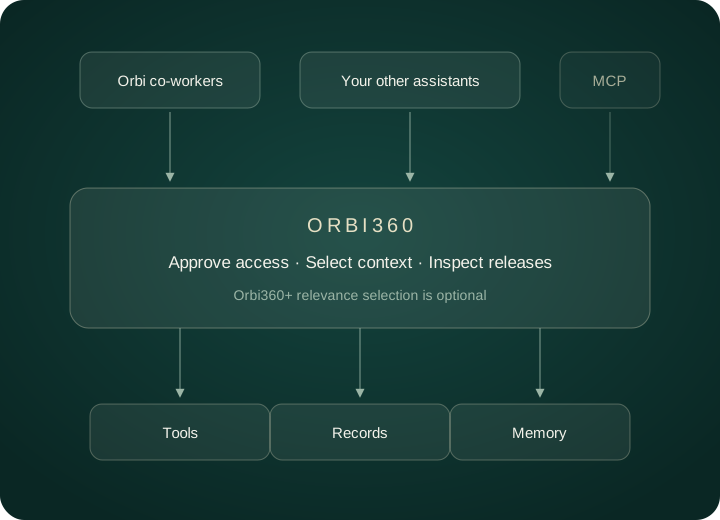
Make it useful
Choose one role and one useful result. Build from there.